
What Does an AI Receptionist Cost? A Simple Small-Business Guide
Use a simple four-input calculator to estimate an AI receptionist's monthly and first-year cost, then check the few extra costs that matter most.
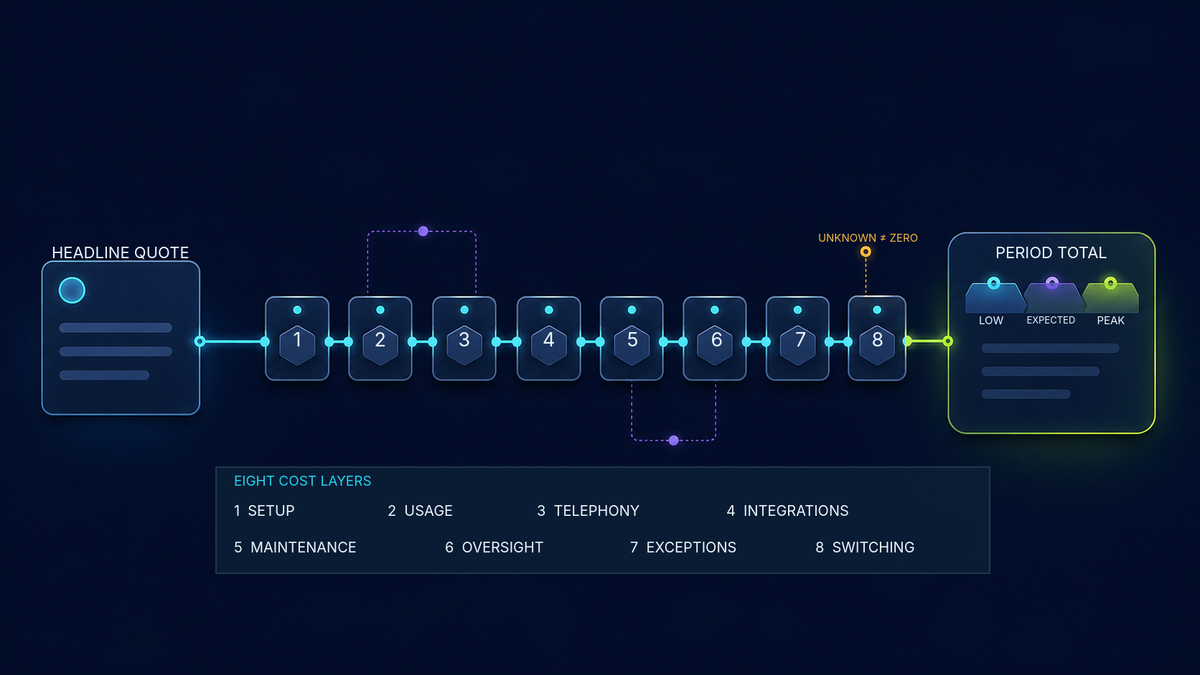
Quick answer: There is no single price that fits every business. Your cost depends mostly on the monthly fee, the minutes you use, the minutes included in your plan, and the price of extra minutes. A setup fee may also affect the first year.
Use the simple calculator in this guide for a quick estimate. Then check the provider's current quote and terms before you decide. An estimate is not a quote or guarantee.
Start with a quick estimate
You should not need to build a spreadsheet or enter a long list of costs just to get a useful starting point.
The LucidChat quick calculator uses four visible inputs:
- Monthly base price — the fixed monthly plan fee.
- Expected monthly minutes — the number of AI-handled minutes you expect to use.
- Included minutes — the minutes already covered by the plan.
- Overage price per minute — the price for each minute above the plan allowance.
A fifth field for a one-time setup cost stays closed unless you choose to open it.
The calculator shows:
- estimated monthly cost;
- estimated first-year cost; and
- a simple visual that separates the base fee, extra usage, and setup cost.
Calculator companion: Use the calculator provided with this guide to enter the four figures and see the estimate. It does not collect or send your inputs.
Excel companion: The downloadable workbook uses the same inputs and estimates for readers who prefer a spreadsheet.
If you cannot use either companion, use this short calculation:
Extra minutes = the greater of 0 or (expected minutes - included minutes)
Monthly estimate = monthly base price + (extra minutes × overage price)
First-year estimate = (monthly estimate × 12) + optional setup cost
Free planning tool
Quick AI receptionist cost estimate
Use four simple numbers from a provider's pricing page or quote. This gives you a planning estimate—not a quote, guarantee, or complete total cost.
A quick example
Imagine a plan has a monthly fee, includes some minutes, and charges for extra minutes. If you expect to stay within the included amount, your quick monthly estimate is the base price. If you expect to go over, add the price of those extra minutes.
Use the provider's real numbers. This guide does not insert sample prices because sample prices can look like a market promise when they are not.
What the calculator includes
The quick calculator is meant to answer one practical question:
“Based on the plan and usage I expect, what might I pay each month and during the first year?”
It includes the four figures that are easiest to find in a basic quote. It can also include a one-time setup fee.
This simple view is useful when you want to compare two or three plans without becoming a billing expert.
What the calculator leaves out
The quick result is a starting point. It may not include every charge in a final invoice.
Possible extra costs include:
- a business phone number or phone carrier;
- call transfers or forwarding;
- text messages, recordings, or storage;
- calendar or customer-management connections;
- staff time for updates and review; and
- costs when you switch or cancel.
You do not need to estimate every item before using the calculator. Just check the important extras before signing an agreement.
Important: An unknown cost is not the same as zero. If a provider cannot confirm an item, mark it unknown and ask for a written answer.
Five costs worth checking
A formal buying review may examine more categories. For a quick first estimate, start with these five checks.
1. Setup
Setup may include gathering business information, planning call routes, connecting software, testing, and training staff.
Ask one clear question:
“What work is included in the setup price, and what would cost extra?”
A basic greeting is not the same as a tested call flow with scheduling, transfers, and staff training. Make sure the quote describes what you will receive.
2. Monthly plan and usage
The monthly plan may include a set number of minutes. Some providers charge for extra minutes. Others sell larger blocks or use a different billing unit.
Check:
- when a billed minute starts and ends;
- whether partial minutes are rounded up;
- whether unused minutes expire;
- what happens when you reach the limit; and
- whether busy periods cost more.
Different providers may build their prices in different ways. First-party pages from Vapi, Retell AI, Twilio, and OpenAI show that voice services can use different units and parts. Follow the exact quote you receive instead of treating one provider's billing model as a rule for all providers.
3. Phone service and transfers
The AI service and the phone network may appear on the same bill or on separate bills.
Ask whether the price includes:
- a local or toll-free number;
- inbound calls;
- forwarding from your current number;
- transfers to staff;
- recordings or transcripts; and
- more than one call at the same time.
If keeping your current number matters, confirm who controls it and how a future move would work. The Federal Communications Commission explains that number porting may let customers keep a number when changing providers, though practical limits can apply.
4. Connections and staff time
An AI receptionist may need to connect to a calendar, customer-management system, shared inbox, or another tool. The connection might require a higher software plan or extra setup.
Your team will also spend some time on the service. Someone may need to:
- update hours, services, and policies;
- review a small sample of calls;
- handle transfers and complaints;
- check that bookings and records are correct; and
- review bills and usage.
You do not need a perfect labor estimate on day one. Name the tasks and the person who will own them. Then measure the real time during a small test.
5. Problems and switching
A human transfer can be the right result. A failed transfer, wrong answer, duplicate booking, or outage can create extra work.
Keep planned handoffs separate from mistakes. Then ask how the provider handles service problems and what support is included.
Also ask what happens if you leave. Can you export call records? Can you keep your number? Is there a cancellation fee or minimum term? Written answers make the true cost easier to understand.
Compare the same usage
The quickest fair comparison is to enter the same expected minutes into every plan.
Do not use a quiet month for one plan and a busy month for another. If your call volume changes a lot, run the calculator three times:
| View | What to enter | Why it helps |
|---|---|---|
| Quiet month | A recent low month | Shows the likely minimum |
| Typical month | A normal recent month | Gives the main estimate |
| Busy month | A real seasonal or campaign peak | Shows overage risk |
Use recent phone records if you have them. If you do not know your minutes, label the number as an estimate and replace it after a small test.
The U.S. Small Business Administration explains the value of separating one-time, fixed, and changing costs when planning a business. The calculator follows that simple idea: setup is usually one-time, the base plan is fixed, and overage changes with use. This article is educational and is not accounting or tax advice.
Three simple examples
These examples are fictional. They do not include prices, savings claims, or customer results.
After-hours coverage
A home-service business wants help only when the office is closed. It enters its expected after-hours minutes into each plan.
The owner also checks whether transfers to the emergency contact cost extra. The best choice is not just the lowest monthly estimate. It must also support the right handoff.
A seasonal business
An appointment business has quiet months and sharp peaks. It runs the calculator once for a typical month and once for its busiest month.
The second result shows whether extra minutes could cause a surprise bill. The owner also checks whether unused minutes carry forward.
A business keeping its phone number
A business wants to keep its public number and send call details to its current customer-management system.
The quick calculator covers the plan and expected usage. Before choosing, the owner also checks forwarding, software connection, and number-transfer costs.
Questions to ask every provider
You do not need a 30-line worksheet. Send the same short list to each provider:
- What is the monthly base price?
- How many minutes are included?
- What is the price for extra minutes, and how are partial minutes rounded?
- Is there a setup fee, and what does it include?
- Are phone numbers, transfers, recordings, and text messages included?
- Are calendar or customer-management connections included?
- What happens when we reach the usage limit?
- What support and ongoing updates are included?
- What is the contract term, renewal rule, and cancellation process?
- Can we keep our phone number and export our data if we leave?
Ask the provider to show these answers in the quote, rate card, or agreement. If the documents disagree, request a written correction before relying on the estimate.
Compare the cost with what you use now
Compare the AI receptionist with your real current setup. That might be voicemail, staff rotation, an answering service, or a mix.
Use the same scope on both sides. If the AI receptionist would handle only after-hours calls, compare it with the after-hours part of your current setup. Keep work that still needs a person in both options.
Do not count every missed call as lost revenue unless you have measured that result. Do not count an employee's full pay as savings unless the business has actually made that staffing decision.
A fair comparison can be simple:
| Current setup | Proposed setup |
|---|---|
| Phone and answering-service bills | Base plan and expected overage |
| Staff time spent answering and returning calls | Staff time for review and handoffs |
| Current software used for booking or records | Any added software or connection cost |
| Known rework from incomplete call details | Expected support and correction work |
Keep unknowns visible. A short honest comparison is better than a detailed guess.
Frequently asked questions
How much does an AI receptionist cost per month?
There is no reliable universal amount. Start with the monthly base price, included minutes, expected minutes, and overage price. Then check setup and any important extras in the provider's current quote.
What is usually included?
There is no standard package. A plan may include a receptionist, phone number, minutes, setup, support, or software connections. Any of those may also cost extra. Ask for a clear list of what is included and excluded.
Is per-minute pricing cheaper than a monthly plan?
Not always. The result depends on your usage, included minutes, minimum charges, rounding, and busy months. Run the same expected minutes through both plans.
What counts as a billed minute?
The provider's current billing rules decide. Ask whether ringing, silence, voicemail, hold time, transfers, and work after the call are billed.
Are phone charges included?
Sometimes. A provider may bundle phone service, charge for it separately, or require another carrier account. Confirm number rental, forwarding, transfers, recordings, and text messages.
How much staff time should we expect?
Start with the real tasks: updates, call review, transfers, complaints, access, and bill checks. Estimate the time, then measure it during a limited test. This guide does not use a universal staff-time claim.
Does an AI receptionist replace an employee?
This guide does not assume that it does. Many calls still need judgment, follow-up, or expert help. Compare the exact work the system can handle with the work people will continue to own.
How should we plan for a busy season?
Run the calculator with a real busy-month estimate. Check overage, the number of calls the service can handle at once, and what happens when a person or booking time is not available.
Can we keep our business phone number?
Often, but not always on the timing or setup you prefer. Confirm who controls the number, whether it can be moved, and how calls will be protected during a change.
What if a cost is unclear?
Mark it unknown, not zero. Ask the provider for a written answer and update your estimate.
The bottom line
You do not need a complicated model to get a useful first estimate.
Start with four numbers: the monthly base price, expected minutes, included minutes, and overage price. Add setup cost only if it applies. Use the provider's current figures and compare the same usage across every plan.
Then check the few extras that matter to your business: phone service, transfers, software connections, staff time, contract terms, and the cost of switching.
The result is still an estimate. It is not a quote, promise, or guarantee. Pricing and terms can change, so confirm them in the current quote and agreement before you decide.
Author and disclosure: The LucidChat Editorial Team creates practical guides from reviewed product information and cited sources. AI tools may help with drafting, research organization, and visuals. A responsible LucidChat editor reviews claims, sources, formatting, and publication decisions before release. This article does not report a customer result, testimonial, savings figure, or universal market-price study. Product details and commercial terms can change. Educational information only; not accounting, tax, legal, privacy, security, or financial advice.
Prefer a spreadsheet? Download the matching Excel workbook. It opens with blank inputs and uses the same calculation rules.
Download the Excel calculator